
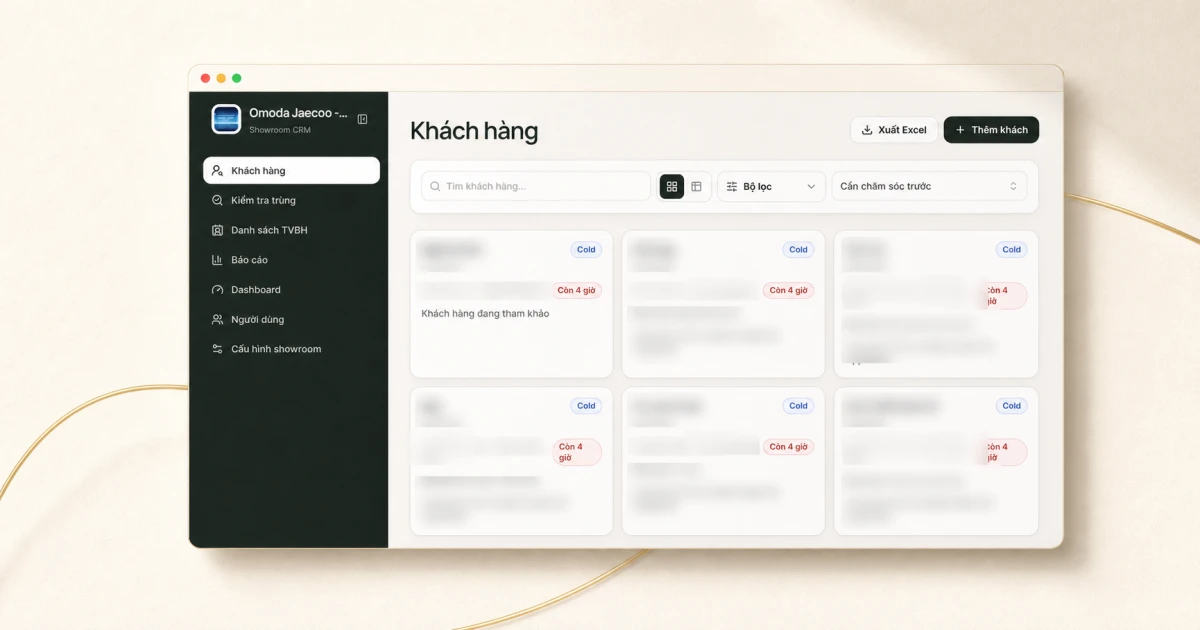
A sales CRM can look complete and still leave the team wondering about the one question that matters on Monday morning: who needs a call today?
It sounds like something a customer list should answer. However, a showroom customer may have requested a quotation, booked a test drive, discussed financing, disappeared for a week, and returned with a different model in mind (possibly after speaking with somebody else). The database may contain every one of those facts while giving a sales manager no quick way to tell which opportunities are about to cool down.
When we built a CRM for Omoda & Jaecoo Vinh, the conventional pipeline diagram and catalogue of fields could wait. We followed the next follow-up, because that was where the showroom’s operating method became visible.
The sales record wasn’t the product
Most CRMs can hold a name, phone number, vehicle preference, and pipeline stage, which is all useful but wasn’t where this project became specific to the showroom. The difficult part was turning a working agreement between the salespeople and their manager into something the product could support without nagging everybody all day.
An active customer needed a clear owner (not a shared pool), a meaningful interaction needed to leave a record, and that owner needed to know when to follow up again. Meanwhile, the sales lead needed to see where attention was required without collecting updates through meetings and group chats. Once we described the problem in those terms, the CRM was no longer just a contact database. It had to participate in the daily rhythm of the team, or people wouldn’t trust it to guide the morning’s work.
We turned follow-up into a visible clock
The customer list therefore defaults to the work that needs care first, with each opportunity showing its owner, interest level, vehicle preference, and the time remaining before another follow-up is due. Salespeople can still search and filter when they have a particular customer in mind, but they don’t have to construct a report before the screen becomes useful (and they can’t quietly forget the opportunities that are due first).
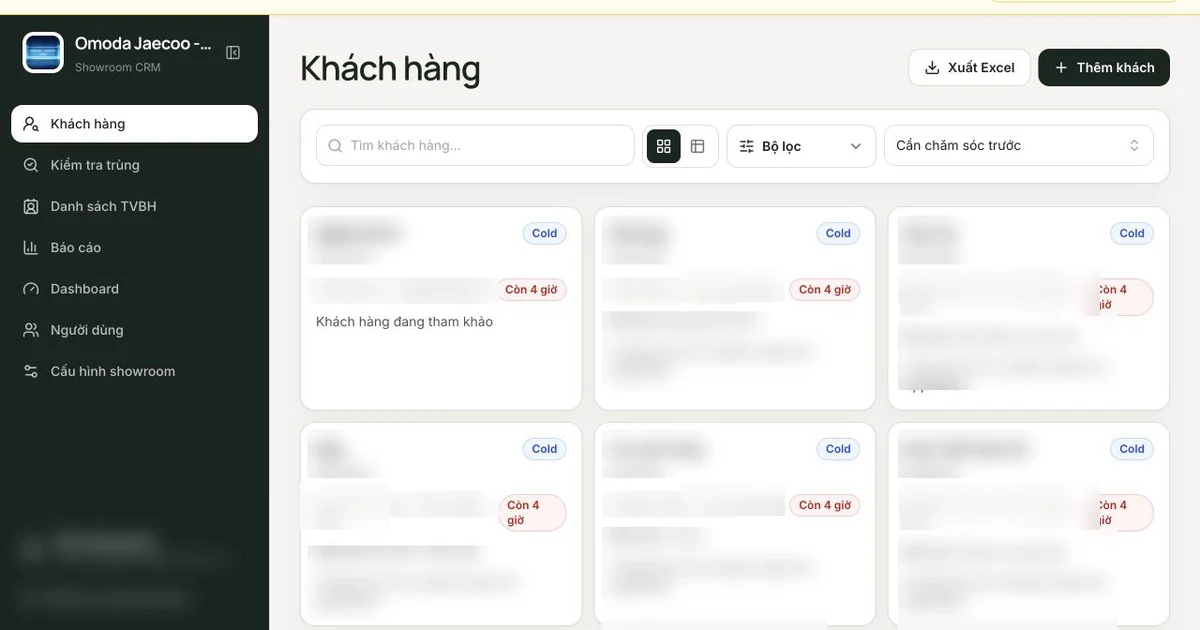
For this showroom, recording a meaningful interaction moves the care deadline forward by ten days. It is a small product rule, although it does more for daily behaviour than another dashboard tile (and certainly more than another lead count): the salesperson gets a concrete next moment, while the manager gets a consistent way to distinguish active care from a name merely occupying a row.
The interaction can’t be an empty button press, either. That would defeat the rule. A salesperson records what happened and can attach supporting evidence, after which the history is preserved instead of being silently rewritten later. Consequently, the manager doesn’t have to ask somebody to reconstruct the last three conversations from memory; there is a timeline to inspect.
Manager visibility needed to lead back to the customer
Sales performance reports are part of the platform, but a total rarely tells a manager what to do next. If one salesperson has fewer completed interactions this week, for example, placing the number on a leaderboard doesn’t explain whether ownership is unclear, several customers are waiting, or the opportunities simply aren’t comparable.
Consequently, we connected the reporting and customer views. A sales lead can notice a pattern in activity or performance and then move into the opportunities behind it, where the owner, care deadline, interaction history, and current vehicle interest are visible together (without opening a separate message thread).
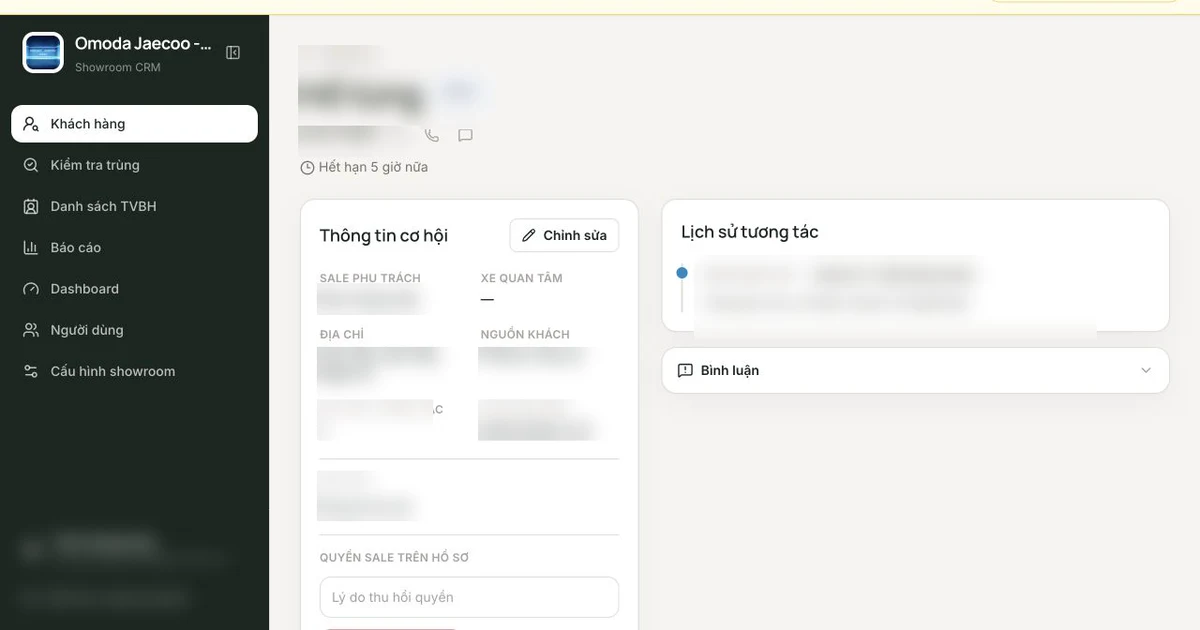
This changes the tone of a management conversation because the sales lead can discuss a particular opportunity with its assigned salesperson instead of asking for a general update. Comments and notifications remain attached to that customer, which means the next person reading the record can understand both the decision and the context that produced it.
However, visibility isn’t automatically helpful when access is too broad. Phone numbers are valuable, assignments change, and two salespeople shouldn’t unknowingly work the same opportunity, so we treated ownership as a permission boundary (not merely a decorative label on a card).
The assigned salesperson can therefore use the contact details they need, while other people see only what their role allows. A manager can reassign access as the team changes without erasing the underlying history. These choices look administrative until the first disagreement about who spoke to a customer. In practice, they’re what lets people share context without making ownership ambiguous.
Why a standard CRM wasn’t enough
There is no shortage of capable sales software, and if the showroom had needed only contacts, tasks, notes, and a conventional pipeline, an existing product would have been the sensible choice. The gap wasn’t a missing feature in isolation. Several rules needed to work together.
The follow-up clock had to renew from a real interaction, urgent care had to rise to the top by default, and managers had to move from a performance view into the opportunity that explained it. Moreover, customer-level discussion needed to sit beside ownership and history, while access to contact details needed to follow the assignment. A standard CRM can usually be configured around one or two of these requirements, but the friction returns when the team maintains the rest through conventions, spreadsheets, and reminders outside the system.
At that point the software contains the data, while the operating method lives somewhere else. That was the gap. Therefore, for Omoda & Jaecoo Vinh, we put the operating method into the product instead of asking the team to remember all the missing rules.
The useful outcome is a better way to run the work
The platform gives each salesperson a clearer answer to “what should we do next?” while letting the sales lead inspect performance and follow the thread down to a real opportunity. It also gives the team one place to coordinate around a customer without separating the conversation from the record (or depending on the right person to remember what happened).
Quoc Huy, the showroom director, described the work this way:
“The Notus team understood what we needed quickly, tailored the solution to how our showroom operates, and introduced better ways for the sales team to work together.”
Tran Hoang Quy, Head of Sales, therefore sees the difference in the team’s daily work:
“The new platform replaced our manual setup and gives me a much clearer view of the sales team. I can spot problems earlier and coach each salesperson more effectively.”
However, we haven’t published a before-and-after conversion number for this implementation, and a cleaner workflow by itself doesn’t prove one. What we can show is the delivered capability: a custom sales workflow in which ownership, timing, performance, and collaboration reinforce one another instead of sitting in separate tools.
That distinction matters to how we judge custom software. A bespoke screen isn’t enough. Therefore, the product should make an important way of working easier to see, follow, and improve after the first release. If it can’t do that, we’d rather leave the process alone.
If you are deciding whether a workflow warrants its own system, our guide to when custom software is worth it offers a practical way to think through the decision. If the harder question is still what to tackle first, read what we ask before writing code.
Cover image courtesy of Omoda & Jaecoo Vinh.
Common questions
Before you decide.
Why did the showroom need a custom CRM?
The important workflow was more specific than storing contacts and pipeline stages. Salespeople needed a clear follow-up deadline for each customer, while managers needed to see ownership, activity, overdue care, and collaboration in one place.
How does the follow-up workflow work?
Each customer opportunity has an owner and a care deadline. Recording a meaningful interaction moves the deadline forward by ten days. The customer list puts the most urgent follow-ups first, so the next action is visible without relying on memory.
What can sales managers see?
Managers can review customer ownership, interaction history, follow-up status, team activity, and sales performance reports. They can also discuss a specific opportunity with the assigned salesperson inside the customer record.
Does the case study publish a conversion result?
No. This case study describes the delivered workflow and what it makes possible. We have not published a controlled before-and-after conversion result, so we do not claim one.